Orange Conetag:orangecone.com,2010-06-15://22013-01-06T03:56:48ZMike Kuniavsky's public notebook. email me at: blog c/o this site.Movable Type 5.02A new chapter: PARCtag:orangecone.com,2013://2.4442013-01-06T03:40:35Z2013-01-06T03:56:48Ztl;dr: I've shut down my private consulting practice and stepped down as CEO of ThingM. On Monday I start my job with the Innovation Services group at PARC, a technology and strategy consulting team within the research organization formerly known as Xerox PARC. Full story I've been a consultant for most of my professional life. I started as an undergrad at the University of Michigan in 1988 helping people format their resumes with Microsoft Word ("tabs, not spaces!") and mount reel-to-reel tapes on Michigan's proprietary mainframe operating system, MTS ("fixed or variable blocking?"). I then moved on to Presence, where I helped both Hollywood studios and hot sauce shops develop their first web sites. At HotWired, I started a user research group that became a kind of in-house consulting group for the company, researching HotWired's own products, and then after Lycos acquired it, Lycos' portfolio. Then there was freelance user research consulting and the founding of Adaptive Path, the UX consultancy. Since I left AP in 2004, I have expanded my user experience design practice as the landscape of digital technology has broadened and diversified. What I do now includes the design of most kinds of digital devices and emphasizes...Mike Kuniavskyhttp://www.orangecone.com/tl;dr: I've shut down my private consulting practice and stepped down as CEO of ThingM. On Monday I start my job with the Innovation Services group at PARC, a technology and strategy consulting team within the research organization formerly known as Xerox PARC.
Full story
I've been a consultant for most of my professional life. I started as an undergrad at the University of Michigan in 1988 helping people format their resumes with Microsoft Word ("tabs, not spaces!") and mount reel-to-reel tapes on Michigan's proprietary mainframe operating system, MTS ("fixed or variable blocking?"). I then moved on to Presence, where I helped both Hollywood studios and hot sauce shops develop their first web sites. At HotWired, I started a user research group that became a kind of in-house consulting group for the company, researching HotWired's own products, and then after Lycos acquired it, Lycos' portfolio. Then there was freelance user research consulting and the founding of Adaptive Path, the UX consultancy. Since I left AP in 2004, I have expanded my user experience design practice as the landscape of digital technology has broadened and diversified. What I do now includes the design of most kinds of digital devices and emphasizes the relationship between devices, online services and business strategy. Nevertheless, the form of this work has largely not changed: I'm still consulting.
There's a second thread to my work: making electronic things. In college I did installation art, video and performance. During the HotWired and Adaptive Path days I spent much of my free energy on Burning Man art projects and constructing theme camps (I can tell you how to power 3/4 of a mile of Christmas lights, a sound system and a full kitchen on one 15KW diesel generator!). ThingM has been the most satisfying project of all, and working with Tod Kurt for six years has been one of the most educational, creative and fun of my life. We just sold more blink(1)s in the last six months than all of our products combined over our first three years. Today, it looks like the momentum toward making ThingM into a successful consumer electronics company has finally started. To use Eric Ries' term, we have finally figured how to get our "engine of growth" going.
Six months ago I was sure that my future was going to be more about making things with ThingM than UX consulting. Then, as happens perhaps only a couple of times in life, a unique opportunity came along and everything changed. As I was looking for consulting projects at the beginning of the year, I contacted my old friend Victoria Bellotti at PARC to see if she knew of any interesting UX consulting projects. She said she didn't, but she'd keep an eye out. Some months later, she kept her promise and I was introduced to Patrick Cook, the director of PARC's new Innovation Services group, who connected me with a project inside PARC that needed some user experience strategy and design assistance (more on that project in a later post). For the next five months I had one of the best consulting experiences of my life. I worked with an experienced, smart, focused and creative team inside PARC on a project that balanced bleeding-edge technological innovation with a pragmatic business focus. These are both important to me, but I find them together rarely. It had the energy of a startup without the freak outs, and the intellectual rigor of an academic project with the polish of a commercial product. I had known of its reputation, of course, but working there I became increasingly impressed with the level of technical sophistication, deep wells of knowledge, and work process at PARC.
When Patrick asked me to join his team on a permanent basis, I said yes. I start at PARC's Innovation Services group on Monday. The group brings PARC's deep technical resources (in everything from ultraviolet LEDs to machine learning, computer vision and social network analysis), industry connections, and user research experience to organizations looking to create new technologies, develop new services, and identify new business opportunities. In other words, it's a business consulting organization with the resources of a world-class research lab, backed by an enormous electronics manufacturing and document services company.
I admit I'm daunted by the prospect of working for such a famous organization and I hope that 13 years of being my own boss haven't made me unable to work for someone else. But this was an opportunity I couldn't pass up. I'm very very excited to work with old friends and brilliant new colleagues.
As for ThingM, I'm stepping down as CEO, though my close relationship with the company will continue. I am still an active advisor and co-owner, meeting our (growing!) company staff on a weekly basis. Right now I'm working to get blink(1) into traditional consumer electronics sales channels. Tod and I have started planning the blink(2), which we hope to release this quarter or next.
My independent consulting business, however, is on hold for the forseeable future. And I'm glad. I love the variety of consulting and I have had great clients and worked on challenging and rewarding projects. But the life of an independent consultant means preserving the headspace to do good work while juggling multiple projects and constant business development . At PARC we will have all these same challenges--every consulting organization does -- but I'm looking forward to not having to do it alone.
That said, I'm still consulting! I will be delighted to work with organizations that are interested in world-class ethnography, technology development and user experience design. PARC can provide all of these -- at competitive rates and with the some of the most talented and experienced technology developers on earth.
Email me and I'll give you more details: mikek at parc.com (after Monday ;-).
]]>
The New Product Ecosystem (Designers & Geeks Talk)tag:orangecone.com,2012://2.4432012-10-27T21:21:34Z2012-10-29T03:29:12ZLast week I had the pleasure of presenting another iteration of my recent presentation on how the ideas behind Web design--specifically the use of iterative development based on analytics--can/will change the design and production of physical objects. Video Slideshare Designers and-geeks 2012-presentation_0.2 from Mike Kuniavsky Click through to the page on Slideshare and open the Notes tab to see the transcript synchronized with the slides. Scribd Designers-And-geeks 2012 Presentation 0.1(function() { var scribd = document.createElement("script"); scribd.type = "text/javascript"; scribd.async = true; scribd.src = "http://www.scribd.com/javascripts/embed_code/inject.js"; var s = document.getElementsByTagName("script")[0]; s.parentNode.insertBefore(scribd, s); })(); PDF You can download a PDF with all the slides and transcript. Transcript Thank you Joe for inviting me tonight. As soon as I saw your logo, I knew I had to participate. First, let me tell you a bit about my background. I'm a user experience designer. I was one of the first professional Web designers in 1993, where I was lucky enough to be present for the birth of such things as the online shopping cart and the search engine. This is the navigation for a hot sauce shopping site I designed in 1994. I'm proud of the fact that 16 years later they were still using...Mike Kuniavskyhttp://www.orangecone.com/
Last week I had the pleasure of presenting another iteration of my recent presentation on how the ideas behind Web design--specifically the use of iterative development based on analytics--can/will change the design and production of physical objects.
Transcript
Thank you Joe for inviting me tonight. As soon as I saw your logo, I knew I had to participate.
First, let me tell you a bit about my background. I'm a user experience designer. I was one of the first professional Web designers in 1993, where I was lucky enough to be present for the birth of such things as the online shopping cart and the search engine. This is the navigation for a hot sauce shopping site I designed in 1994.
I'm proud of the fact that 16 years later they were still using the same visual identity. These were some of the oldest pixels on the Web.
Here's one of my UI designs for the advanced search for HotBot, an early search engine, from 1997. If you're wondering why Google's front page is no minimal, I think it was because we were doing this.
Since then I've consulted on the user experience design of dozens, maybe hundreds of web sites. Here's one for credit.com, who were fantastic clients a couple of years ago.
I sat out the first dotcom crash writing a book based on the work I had been doing. It's a cookbook of user research methods. It came out in 2003 and the second edition just came out last month. Buy a copy for everyone on your team!
And 2001 I co-founded a design and consulting company called Adaptive Path.
I left the Web behind in 2004 and founded a company with Tod E. Kurt called ThingM in 2006.
ThingM is a micro-OEM and an R&D lab. We design and manufacture a range of smart LEDs for architects, industrial designers and hackers. Our products appear on everything from flying robots to Lady Gaga's stage show. This is an RFID wine rack that we did about four years ago. The different light colors represent different facets of information that's pulled down from a cloud-based service, such as current market price. This is a capacitive sensing kitchen cabinet knob we did two years ago. It glows when you touch it to creates a little bit of magic in your everyday environment and was an exploration in making a digital product that would still be useful 20 years after it was made.
In 2010 I wrote a book on the user experience design of ubiquitous computing devices, which I define as things that do information processing and networking, but are not experienced as general purpose computing or communication devices.
I also organize an annual summit of people developing hardware design tools for non-engineers.
However, ThingM, books and conferences are not my day job. They're entertaining sidelines. My primary day job is as an innovation and user experience design consultant focusing on the design of digital consumer products. Here are some I've worked on for Yamaha, Whirlpool and Qualcomm.
The last couple of years my clients have been large consumer electronics companies. I've worked with them to design new products and services and to help them create more user centered and company cultures. I can't give you any details, but I'll tell you that big data analytics, real- time image recognition, distributed processing, and machine learning are pretty awesome.
This spring I finally got to do a project I can talk about. I worked with Sifteo, the game company, to design all of the non-game UX of their second generation platform. It was a great project. Stock up on these for Christmas.
Let me start with a little history of manufacturing efficiency. Now this is only barely history, since I'm not a historian, but I've been reading about the history of technology for a couple of years and I came up with this model for understanding several trends in manufacturing, and I think it has some face validity.
If you look at how many things you could produce from one unit of work, you see an interesting curve. For most of the last ten thousand or however many years, when you put one unit of work into a project, you got roughly one thing out of it. I realize "a unit of work" is somewhat imprecise, but bear with me. During this period you see some gains in efficiency through tools like the potter's wheel, the plow, the horse, the lever, fire, but those efficiencies were, roughly speaking linear. No one had the capability to make 10,000 cooking pots in a day. Then this thing happens. James Watt's patent on the improvement to Newcomen's steam engine expires in 1800. Boom. The Industrial Revolution. Exponential growth in the efficiency of production. 10,000 cooking pots a day is easy. That's followed by steady increases in efficiency until we get to today's industrial society.
OK, that's fairly familiar. Now, let's look at a related curve, the number of units of work to make the FIRST thing. Making the first thing of any set is hard. You become efficient later on, but the first time is not efficient. For most of history, that's about one unit of work. And the funny thing about the Industrial Revolution is that as it made it much easier to make many things, it made it much harder to make that first thing. Mass produced objects are really complex, they require you to make the tools that make the tools that make the end product. It's no longer a process that a single person, or even a small workshop, can even afford to do time, money, or knowlege-wise. It requires a lot of expertise to be acquired and then consolidated into a single geographic location. Here is our familiar experience of manufactured products: pick nearly everything you own or see and it's almost impossibly complex for you to make one.
And then this other thing happens. In October 2009 Stratasys' core patent on computer controlled additive manufacturing expires. Boom. The cost of making the first thing starts to plummet while the cost of making lots of things stays the same. The relationship between these two trends is what makes what I'm about to tell you about possible.
That's where this comes from.
Imagine Amazon 8 years from now. It looks like this. Yes, it looks exactly like the Amazon today. It has all of the familiar ways to discover new products, to compare them, to see what people think of them, to see what goes with what. It has wish lists, Gold Boxes, the whole thing. But there's a crucial difference. Instead of Amazon being the front end to a fulfillment system, as it is today, the Amazon of 2020 is the front end to a set of factories.
The back end doesn't look like UPS, but Ford Motor Company. When you click on on buy you start a manufacturing process at the factory nearest you, instead of a delivery process from a warehouse far away.
River Rouge photo by Lotus Carroll, creative commons http://www.flickr.com/photos/thelotuscarroll/6695794423/
I know what you're thinking: "Mike just saw a MakerBot and got all excited. We've heard this all before, it's called mass customization, and it's never worked out." Why talk about this again? Because I think that the presentation of mass customization as "configurators for everything" (such as this 1998 project from Levi's) missed the point. That totally gets the user motivation wrong: most people don't want to be designers of everything, they want to design a couple of things, but be consumers of the rest. Some people want to make their own clothes, but those people typically don't build their own cars, and vice versa. Most people have better things to do than figure out what colors and patterns look good together, what makes them look sexy or powerful, how much firmware will fit into the onboard memory. They're busy. They want someone who is a professional to do that research, to think really hard about what they need, to be really fluent in the tools that make it good, then to create a solution.
I'm also not talking about desktop manufacturing. As much as all us geeks want a Star Trek replicator, it's not that useful in practice. We just don't need that much new stuff all the time. Paper printers are useful because they represent high density information that fits into a rich existing culture of information use, and even they're not used nearly as much as ecommerce sites. Outside of work, people probably shop a lot more than they print.
I think more importantly, both mass customization and desktop fabrication imagine a new world that's different than ours. I have nothing against envisioning new worlds and working toward their creation--that's one of the things I do for my clients--but my experience has taught me that creating new worlds, changing the behavior of millions of people, is really hard and takes a really long time. If we look to a world 8 years into the future, odds are that it's not going to have changed that much, the odds are that most of us are not going to have a whole bunch more time on our hands to become mechanical engineers, electrical engineers, software engineers, and material scientists, as much as we'd like to.
Makerbot photo by Scott Beale
2020 will actually probably look and works exactly like our world today, when seen from the outside. It'll still be driven by the thrill of finding something awesome when you're bored surfing the Internet and then making it yours by buying it. The relationship between the consumer and designer will remain intact. Designers still design, ecommerce sites still help people find stuff they like, people still buy.
However, there will be a crucial difference behind the scenes, and it will be this difference that changes our world from one of centralized warehouses to a world of distributed factories.
The difference is analytics. When you order from the Amazon of 2020 a counter is incremented that registers that you, a human being with a set of well-known behaviors and a demographic background, decided to buy this specific version of this specific idea. Moreover, since the world of 2020 is a world of ubiquitous computing, every product has a small bit of digital hardware in it that tracks how the product is used and, with your implicit permission, sends that information back to a central server, which aggregates and anonymizes the results.
This is of course exactly how large-scale Web design works, but now we will map it to all products.
When you have rapid, cheap, distributed low-volume manufacturing capability AND real-time analytics you have a new way of designing products. You can take those Industrial Age design processes that took years to test hypotheses, and you can speed them up by orders of magnitude.
Tight loop iteration between an idea and market validation of that idea is the core of Eric Ries' Lean Startup approach. This is a slide from Steve Blank, who is the patron saint of Lean Startup, that illustrates this basic idea.
My vision--MY hypothesis--is that it's possible to do this with ANYTHING by applying the ideas, practices and technologies we developed for the Net to everything else.
Let's start by assuming we have low volume digital manufacturing, such as this Form1 printer that just got funded through Kickstarter. We know that's coming.
The next piece is hypothesis testing. How do you validate your idea without investing a lot in manufacturing? Well, that component is also coming online.
Even though they sometimes deny it, Kickstarter is a catalog for products that don't exist yet. It gives developers feedback about the popularity of their idea and teaches them how to position it for a market before they've made a single final product. It provides two kinds of hypothesis testing: do people even want your idea? and what do they say they want it for?
Etsy allows very small run electronic products (as long as they're made of felt).
Even fab.com, which sells limited-edition high design products like rugs and backpacks, sells small run electronics.
Here's a new store opening on Valencia in about a month called Dijital Fix. They are a New York-based boutique specializing in limited-run electronics.
These channels are immature, but they're becoming increasingly popular. In effect, they're doing an end run around the traditional consumer electronic sales channels--at the same time that Dijital Fix is opening new stores Best Buy is struggling--and giving developers direct access to their customers so they can test their product hypotheses directly.
This is bringing product development closer to what we've become accustomed to when deploying software on the Web.
The key missing piece we still need to borrow from software is distributed collaborative design tools. To make better hypotheses we need to be able to take advantage of all of those specialized skills--all the different kinds of engineering--wherever they are, and to work together to create a shared understanding of what that hypothesis, that product, is.
For purely digital products we have Github, Basecamp, WebEx, Balsamiq and similar products, but the physical world is way behind. Commercial CAD systems are huge and incredibly difficult to learn. Product Lifecycle Management systems assume that you're always building a commercial airplane, and are also insanely complex.
We are getting new tools, Autodesk's 123D, Ponoko has publishing tools, you can kind of fork projects on Thingiverse. But these tools are really immature.
Sunglass just pivoted a couple of weeks ago from being an online CAD system to being a "Github for 3D." When these products mature, this is going to open creative possibilities immensely.
But it's going to take time. Github got to where it is through an evolution of tools and practices that began with makefiles. The physical world isn't even at the makefile stage.
To me, the whole ecosystem looks like this. Here come the buzz words, so excuse me in advance.
• Digital fabrication, we know what that is. It will allow us to make all kinds of things in small batches.
• Ubiquitous Computing and the Internet of Things is leading to everyday objects that send a stream of telemetry when we bring them home. They have an information shadow in the cloud that can be data mined.
• Big Data Analytics crunches all of that data to create information about people's behavior.
• Social commerce creates sales channels that sell small numbers of products by finding niche markets and letting them market to each other
• And finally, cloud-based design tools will allow designers and engineers to collaborate on the distributed development of physical products.
This is my ecosystem vision: a world where design directly drives product creation, and where data informs design. This is a world where products are made in small numbers
I intend to make this vision my next focus as a designer and entrepreneur. At ThingM we just did the first iteration on Kickstarter of a product we hope will become different and more interesting as we iterate on it. It's the world's best indicator light. It's a highly configurable USB LED and it gives you peripheral awareness of things that are happening on the Net and your local machine. You can pre- order one from us today.
However, I don't expect that we will be able to do all of this by ourselves.
I need your help: tell me what I don't know, where I'm wrong. Tell me who I should talk to and where the opportunities are.
I think this will change the world. I want to change the world. Interested? Talk to me.
Thank you.
]]>
A phone a day: Motorola Moto Q 9m (2007)tag:orangecone.com,2012://2.4422012-04-16T16:25:48Z2012-04-16T16:46:04ZI admit my eyes begin to glaze over with the quantity of me-too generic phones, but past the repetition there's always something interesting. Every phone is an attempt by a company to compete with others making very similar products and to simultaneously advance their own design and manufacturing. Seen from the ground-level, these micro-level incremental changes become significant. Every single device is the product of many people's best work to outdo their competitors and themselves. This phone, which superficially is identical to Samsung's phone from the same era that I profiled a couple of days ago, is trying to do several different things. Both are trying to chip away at RIM's (then) dominance of the business texting market, so their basic form is the Blackberry. With this phone, however, Motorola decided to do two different things: use Windows Mobile as the operating system and create a new visual interface for what they considered the commonly-used functions. Here's a close up: Motorola historically made much more interesting (read: better) hardware than they did software, and this again proves the point. I would list the usability issues with this, but a blog post review from the era already summarized it well: We...Mike Kuniavskyhttp://www.orangecone.com/
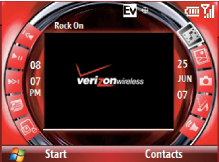
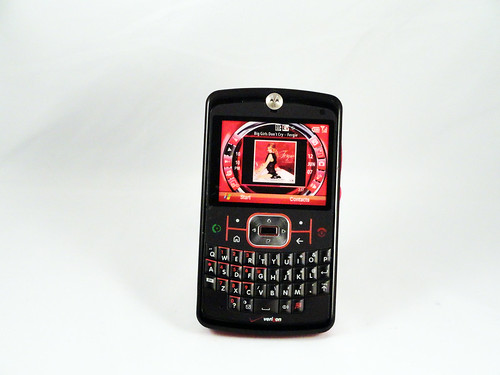
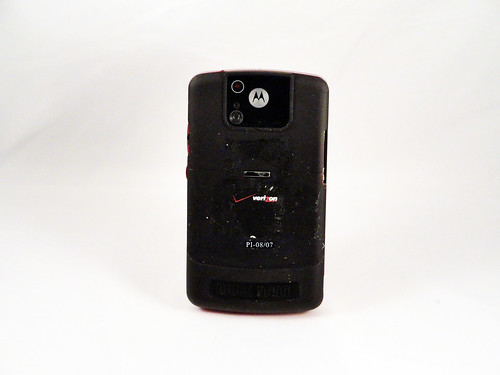
I admit my eyes begin to glaze over with the quantity of me-too generic phones, but past the repetition there's always something interesting. Every phone is an attempt by a company to compete with others making very similar products and to simultaneously advance their own design and manufacturing. Seen from the ground-level, these micro-level incremental changes become significant. Every single device is the product of many people's best work to outdo their competitors and themselves. This phone, which superficially is identical to Samsung's phone from the same era that I profiled a couple of days ago, is trying to do several different things. Both are trying to chip away at RIM's (then) dominance of the business texting market, so their basic form is the Blackberry. With this phone, however, Motorola decided to do two different things: use Windows Mobile as the operating system and create a new visual interface for what they considered the commonly-used functions. Here's a close up:
Motorola historically made much more interesting (read: better) hardware than they did software, and this again proves the point. I would list the usability issues with this, but a blog post review from the era already summarized it well:
We will dispense first with the Q9m's highly advertised "Exclusive Multimedia Home Screen." This is, without a doubt, the most ill-conceived home screen I have ever seen. The iPod Shuffle has a better visual interface than the Q9m.
For starters, none of the buttons are labeled properly and there are not descriptions on the screen (tooltips, etc.) of what any of the buttons do. The icons are arranged in a circle, which makes navigating using a directional pad an adventure because nothing is intuitive. It took me a total of two minutes to fully appreciate just how bad the home screen was. Fortunately, the phone (unlike earlier Verizon cell phones) allows you to turn off the terrible interface and switch to the standard Windows Mobile interface.
]]>
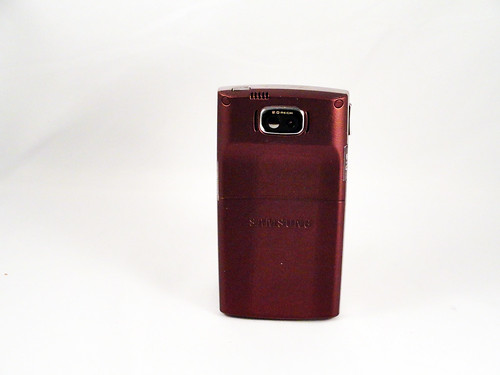
A phone a day: Samsung SGH-a17 Blackjack II (2007)tag:orangecone.com,2012://2.4412012-04-15T02:07:34Z2012-04-15T02:23:37ZWith a name like Blackjack, it's clear who Samsung is gunning for here: Blackberry. For practical purposes the phone is functionally indistinguishable from Blackjack models of the time. The difference, apart from the price (I'm assuming it was cheaper--Samsung was still competing at least partially at price at this point) is the design and finish of the phone. It feels like a business phone and not a phone for teens--the other group of heavy texters: it's solid, heavy and made with materials that feel sophisticated. The rubberized coating on the back is designed to keep the phone stable during (presumed) hours of texting, while the burgundy highlights feel professional (Samsung apparently made a variant for teens in light blue and pink, and it's interesting to see how color changes expectations of functionality). It's actually quite satisfying of a designed object to hold, the product of ten years of refinement of a type. This was released several months after the release of the first iPhone, and I wonder how it felt to the designers to have created a nearly-perfected version of a design that was functionally extinct. Background on the A Phone a Day project....Mike Kuniavskyhttp://www.orangecone.com/
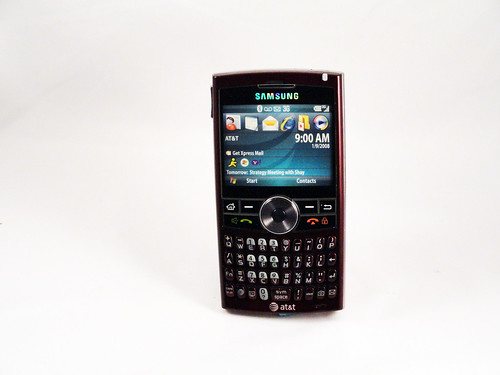
With a name like Blackjack, it's clear who Samsung is gunning for here: Blackberry. For practical purposes the phone is functionally indistinguishable from Blackjack models of the time. The difference, apart from the price (I'm assuming it was cheaper--Samsung was still competing at least partially at price at this point) is the design and finish of the phone. It feels like a business phone and not a phone for teens--the other group of heavy texters: it's solid, heavy and made with materials that feel sophisticated. The rubberized coating on the back is designed to keep the phone stable during (presumed) hours of texting, while the burgundy highlights feel professional (Samsung apparently made a variant for teens in light blue and pink, and it's interesting to see how color changes expectations of functionality). It's actually quite satisfying of a designed object to hold, the product of ten years of refinement of a type. This was released several months after the release of the first iPhone, and I wonder how it felt to the designers to have created a nearly-perfected version of a design that was functionally extinct.
]]>
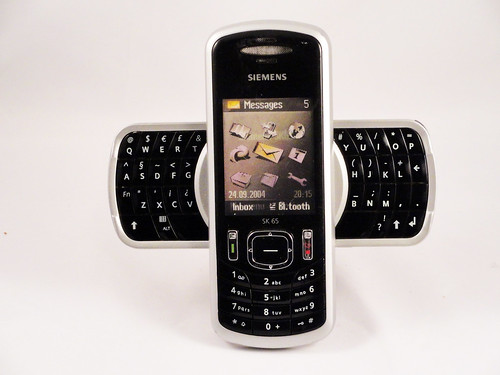
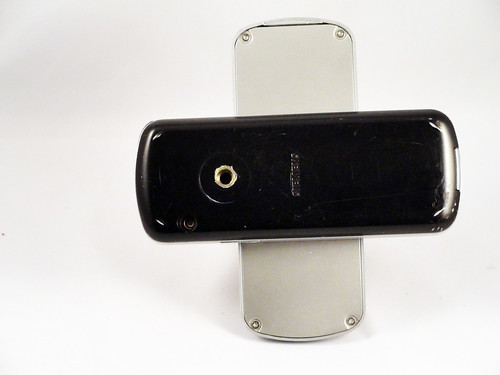
A phone a day: Siemens sk65 (2005)tag:orangecone.com,2012://2.4402012-04-12T17:26:18Z2012-04-12T17:50:37ZOf all of the standard phone form factors, swivel phones have had the least success. I can see why people try them--slicing the phone along its thickness provides nearly twice the surface area to work with--but the swivel mechanism has to be made very carefully (twisting wires and contacts around is a notoriously difficult problem) and none of the individual surfaces end up as big as a slab phone. At that crucial pre-iPhone era where functionality was commodified, however, exploring form factors was seen as a good way to compete. RIM was one of the biggest competitors, and they owned the phones-with-keyboards market, but their keyboards were relatively small. Siemens must have decided that they had an opportunity to use the swivel form factor both to visually differentiate their phone and to create a better, bigger keyboard without impacting the overall size of the phone. In a unique design decision in all phone design (as far as I can tell), they came up with this awesomely wacky X-shaped design. It actually works pretty well, but it feels huge when open, which phones are not really supposed to do (they're, for the most part, discrete devices, even when used publicly), plus...Mike Kuniavskyhttp://www.orangecone.com/
Of all of the standard phone form factors, swivel phones have had the least success. I can see why people try them--slicing the phone along its thickness provides nearly twice the surface area to work with--but the swivel mechanism has to be made very carefully (twisting wires and contacts around is a notoriously difficult problem) and none of the individual surfaces end up as big as a slab phone. At that crucial pre-iPhone era where functionality was commodified, however, exploring form factors was seen as a good way to compete. RIM was one of the biggest competitors, and they owned the phones-with-keyboards market, but their keyboards were relatively small. Siemens must have decided that they had an opportunity to use the swivel form factor both to visually differentiate their phone and to create a better, bigger keyboard without impacting the overall size of the phone. In a unique design decision in all phone design (as far as I can tell), they came up with this awesomely wacky X-shaped design. It actually works pretty well, but it feels huge when open, which phones are not really supposed to do (they're, for the most part, discrete devices, even when used publicly), plus it's unclear whether the bigger keyboard adds enough to justify the overall increase in size. Still, after the 2003 70s sfi-fi craziness of the Xelibri phone line, it's actually a somewhat sedate design.
]]>
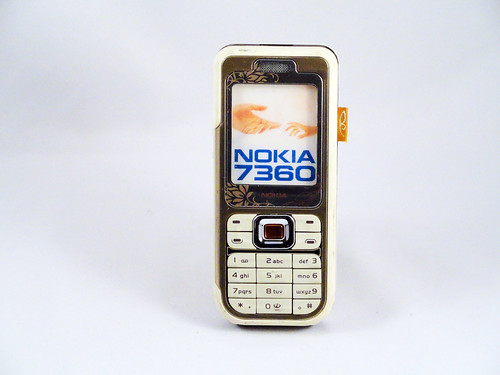
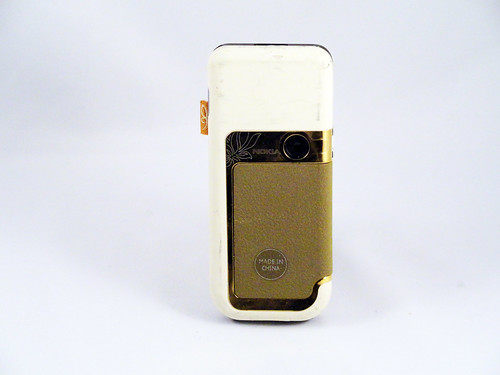
A phone a day: Nokia 7360 (2005)tag:orangecone.com,2012://2.4392012-04-10T16:44:27Z2012-04-10T17:05:45ZThis phone is part of what can only be called Nokia's Baroque line. In 2005 they decided to fall fully into the idea of phones as fashion accessories, as a primary means of self-presentation. This was probably a logical move at the time, which in retrospect will probably be seen as a moment form factors began to stabilize and functionality began to stagnate. People had always bought phones for how they looked, and what that look said about them (and they continue to do this), but at a time when competition on what a phone did was stagnant, it was a natural move to compete on how it looked. Nokia's decision was to borrow the techniques and materials of high fashion and furniture design to create devices that were more about how they looked than what they did. This was probably the most conservative and lowest-end phone in that line, but it still has all the components: exotic materials, prodigious surface decoration, a sophisticated color palette. Plus, in addition to the suede and the gold-and-jewel like d-pad, it also borrows directly from fashion, most directly in its use of the fabric tag. Holding it today, it feels kind of cheap,...Mike Kuniavskyhttp://www.orangecone.com/
This phone is part of what can only be called Nokia's Baroque line. In 2005 they decided to fall fully into the idea of phones as fashion accessories, as a primary means of self-presentation. This was probably a logical move at the time, which in retrospect will probably be seen as a moment form factors began to stabilize and functionality began to stagnate. People had always bought phones for how they looked, and what that look said about them (and they continue to do this), but at a time when competition on what a phone did was stagnant, it was a natural move to compete on how it looked. Nokia's decision was to borrow the techniques and materials of high fashion and furniture design to create devices that were more about how they looked than what they did. This was probably the most conservative and lowest-end phone in that line, but it still has all the components: exotic materials, prodigious surface decoration, a sophisticated color palette. Plus, in addition to the suede and the gold-and-jewel like d-pad, it also borrows directly from fashion, most directly in its use of the fabric tag. Holding it today, it feels kind of cheap, but I think that's because it also understands that fashion IS cheap, that what's important is how a product reads from 10 feet away, not from 2 feet away. This was supposed to be a new class of costume jewelry, not an heirloom, but a fun thing that says something about your choices in commodities.
]]>
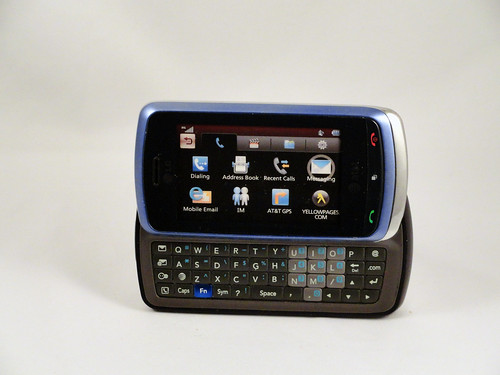
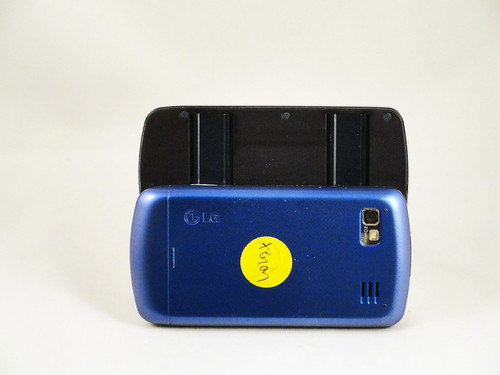
A phone a day: LG Xenon GR500 (2009)tag:orangecone.com,2012://2.4382012-04-08T04:25:55Z2012-04-08T04:38:44ZThis phone does not particularly stand out in the pile of random phones for specific niches that continue to come out. This is a Danger Sidekick derivative (which is itself a derivative of the Blackberry) that's aimed toward people who send a lot of text messages and/or email. It has a post-iPhone touchscreen form factor, but it's clearly designed to be opened and typed on. What's interesting to me about it is that it's a Symbian device. There were not many non-Nokia Symbian devices, and they all suffered to some extent from Symbian's legacy as the "first" smart phone operating system (there are of course disputes about what a smart phone is and who had the first operating system, but Symbian has a good claim to be the best example of the first generation of smart phones, with iOS being the first of the second generation). To me, the use of Symbian means that LG was hedging their bets. I'm sure that they had their own in-house smart phone operating system under development--all the big companies do, I suspect--but that licensing Symbian was a way to have experience with it should it become successful. As we know, it didn't. That...Mike Kuniavskyhttp://www.orangecone.com/
This phone does not particularly stand out in the pile of random phones for specific niches that continue to come out. This is a Danger Sidekick derivative (which is itself a derivative of the Blackberry) that's aimed toward people who send a lot of text messages and/or email. It has a post-iPhone touchscreen form factor, but it's clearly designed to be opened and typed on. What's interesting to me about it is that it's a Symbian device. There were not many non-Nokia Symbian devices, and they all suffered to some extent from Symbian's legacy as the "first" smart phone operating system (there are of course disputes about what a smart phone is and who had the first operating system, but Symbian has a good claim to be the best example of the first generation of smart phones, with iOS being the first of the second generation). To me, the use of Symbian means that LG was hedging their bets. I'm sure that they had their own in-house smart phone operating system under development--all the big companies do, I suspect--but that licensing Symbian was a way to have experience with it should it become successful. As we know, it didn't. That meant that this phone, and every other Symbian device, was locked into an odd role: it had the capability and infrastructure to be an open-ended computing device with a wide variety of different applications running on it (and it already has all of the affordances to be the equivalent of a netbook), but with almost no software available for it. Microsoft and Nokia are in that boat today with Windows Phone 7 and the new Lumia phones, and it'll be an interesting exercise to look back three years from now and see how well they do, and whether they end up like this phone.
]]>
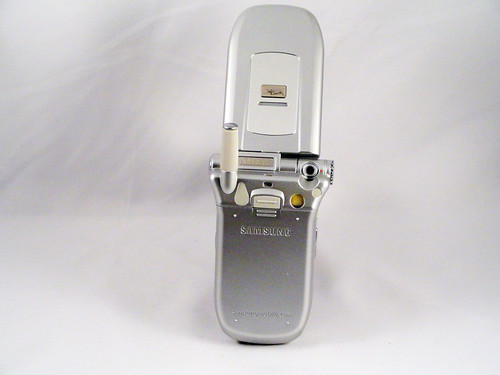
A phone a day: Samsung SPH-a600 (2005)tag:orangecone.com,2012://2.4372012-04-01T04:11:26Z2012-04-01T04:24:48ZI believe that this phone shows Samsung's first early efforts to break away from making generic phones that sold primarily on price to try and introduce some of its own innovations and sell phones based on novel functionality (judging from the generic silver color and it's overall still generic look, differentiation by industrial design had not yet become a priority). The main innovation here is the swiveling camera. The little camera is placed at the pivot of the hinge for the phone, and placed on a small turret that moves from pointing forward to pointing backward at the holder. This is a variant on what Nokia was doing with the 3250, which came out a year later, so clearly at the time there was a perception that: cameras are important, but including more than one camera is expensive, and people want to point the camera at both themselves and at other things. Thus, one solution is to have a camera that pivots from front-facing to back-facing, so that the LCD display can continue to be used. Another is to have two LCD displays--one facing each direction--so that the phone phone can be moved. Companies tried both kinds of designs, but...Mike Kuniavskyhttp://www.orangecone.com/
I believe that this phone shows Samsung's first early efforts to break away from making generic phones that sold primarily on price to try and introduce some of its own innovations and sell phones based on novel functionality (judging from the generic silver color and it's overall still generic look, differentiation by industrial design had not yet become a priority). The main innovation here is the swiveling camera. The little camera is placed at the pivot of the hinge for the phone, and placed on a small turret that moves from pointing forward to pointing backward at the holder. This is a variant on what Nokia was doing with the 3250, which came out a year later, so clearly at the time there was a perception that: cameras are important, but including more than one camera is expensive, and people want to point the camera at both themselves and at other things. Thus, one solution is to have a camera that pivots from front-facing to back-facing, so that the LCD display can continue to be used. Another is to have two LCD displays--one facing each direction--so that the phone phone can be moved. Companies tried both kinds of designs, but this is a great example of the somewhat rarer first idea. Did people actually use it this way? I suspect not. Frankly, I suspect there was a lot of wishful thinking about how carriers were going to drive the kind of high bandwidth use that this kind hardware functionality implied, and the carriers never priced that bandwidth low enough, or designed the functionality well enough, for there to be much adoption.
]]>
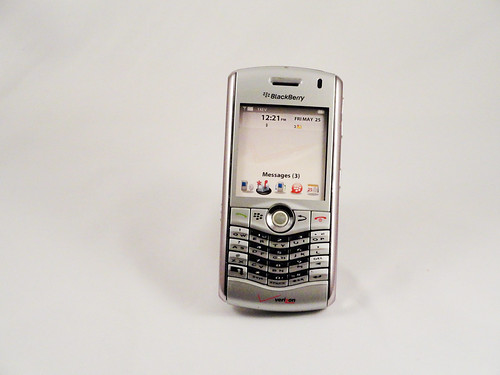
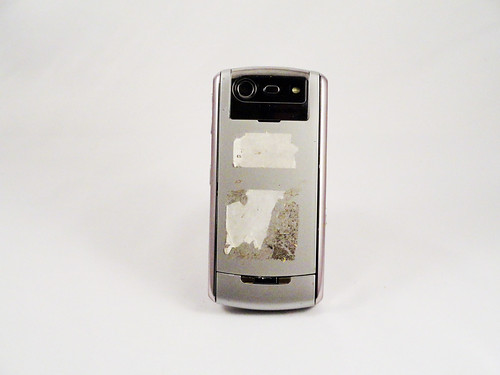
A phone a day: Blackberry Pearl 8130 (2006)tag:orangecone.com,2012://2.4362012-03-28T16:48:10Z2012-03-28T17:04:58ZThe Pearl was RIM's entry into the phone market. Previous models of Blackberries lived in a universe of their own--they were technically phones in the sense that they were general digital portable communication devices but they were much more geared toward email than any other kind of activity--the Pearl aimed to take on Nokia at its core. This was a real phone in the sense that it was shaped like a traditional candybar phone, it had no full keyboard, and it had a prominent camera. In true Blackberry style, however, the company did focus on creating a good keyboard experience, and the keyboard on the Pearl is surprisingly good considering it abandons the one-key-per-letter philosophy and uses predictive text for typing. The gentle V dip makes it clear that they're still expecting people to hold it like a traditional Blackberry and type with both thumbs (it's essentially a tiny version of full-size ergonomic keyboards that angle the keys). The sexiest part of the design is, of course, the trackball. That's why they named it the Pearl. Nearly unique in mobile phone design, the trackball was not a glorified d-pad, but a fully-functional trackball that was tuned to being used with...Mike Kuniavskyhttp://www.orangecone.com/
The Pearl was RIM's entry into the phone market. Previous models of Blackberries lived in a universe of their own--they were technically phones in the sense that they were general digital portable communication devices but they were much more geared toward email than any other kind of activity--the Pearl aimed to take on Nokia at its core. This was a real phone in the sense that it was shaped like a traditional candybar phone, it had no full keyboard, and it had a prominent camera. In true Blackberry style, however, the company did focus on creating a good keyboard experience, and the keyboard on the Pearl is surprisingly good considering it abandons the one-key-per-letter philosophy and uses predictive text for typing. The gentle V dip makes it clear that they're still expecting people to hold it like a traditional Blackberry and type with both thumbs (it's essentially a tiny version of full-size ergonomic keyboards that angle the keys). The sexiest part of the design is, of course, the trackball. That's why they named it the Pearl. Nearly unique in mobile phone design, the trackball was not a glorified d-pad, but a fully-functional trackball that was tuned to being used with a single finger. As I remember, it worked really well (and, fwiw, you can still buy Sparkfun's breakout boards with these on them to play with) and accurately predicted how phone interaction would work when touchscreens ruled the land. I also think that it's an under-utilized affordance, and that more finger trackballs could be put on things.
]]>
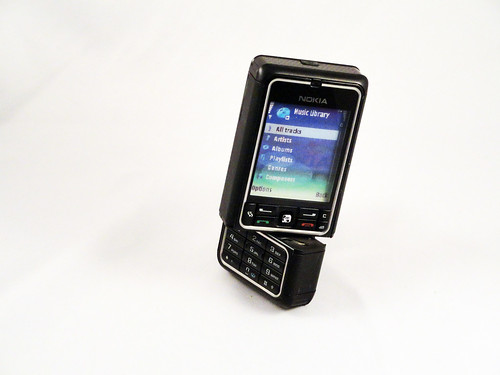
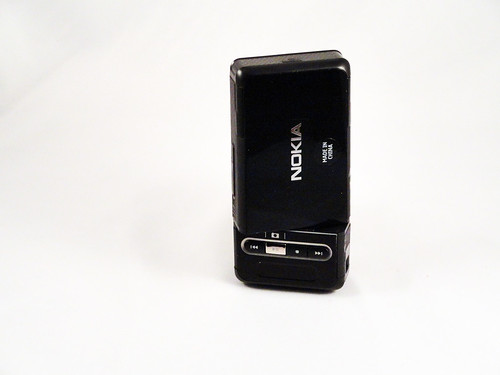
A phone a day: Nokia 3250 (2006)tag:orangecone.com,2012://2.4352012-03-27T16:40:51Z2012-03-27T16:59:37ZThis is one of my favorite cameras from the era when Nokia was really experimenting with form factors. The keypad twists 270 degrees (very satisfyingly, btw, with a great, solid feel and several satisfying index clicks) to move the music and video controls to the front of the camera and to move the camera lens, which is placed (perhaps uniquely in all phone designs) facing right in the bottom righthand corner. You're clearly supposed to flip the camera over, twist it and then look at the screen in portrait mode while pushing the silver camera button, which would fall under the right index finger. I think that this interaction owes a lot to the original Nikon Coolpix cameras, which split down the middle to create a more ergonomic handhold than a flat plane. It's an interesting early experiment in making a phone that's primarily designed to work as a camera and music player (the vestigial keypad guarantees that). Background on the A Phone a Day project....Mike Kuniavskyhttp://www.orangecone.com/
This is one of my favorite cameras from the era when Nokia was really experimenting with form factors. The keypad twists 270 degrees (very satisfyingly, btw, with a great, solid feel and several satisfying index clicks) to move the music and video controls to the front of the camera and to move the camera lens, which is placed (perhaps uniquely in all phone designs) facing right in the bottom righthand corner. You're clearly supposed to flip the camera over, twist it and then look at the screen in portrait mode while pushing the silver camera button, which would fall under the right index finger. I think that this interaction owes a lot to the original Nikon Coolpix cameras, which split down the middle to create a more ergonomic handhold than a flat plane. It's an interesting early experiment in making a phone that's primarily designed to work as a camera and music player (the vestigial keypad guarantees that).
]]>
A phone a day: Motorola DynaTAC 8800x (1987)tag:orangecone.com,2012://2.4342012-03-22T04:30:36Z2012-03-22T04:51:41ZThere is little that can be said about this phone that hasn't been said better elsewhere. It is the canonical first generation cell phone. This is a model from 1987 (specifically model F09DSD8826AN, back when what a phone was named or numbered was irrelevant), so it's not among the very first of these transformational mobile phones, those were from the 8000x series starting in 1983, but it's pretty damned close to the beginning, so it's not from the Cambrian Age of phones, but it's certainly from the Silurian at least. Compared the modern digital mobile phones, it's barely even a computer, most of its magic coming not from being a portable networked computer tuned for data--as digital phones were--but from being an incredibly compact, powerful analog radio. It's digital functionality (as I understand) extends to remembering up to 30 phone numbers, using an interface (the keys at the bottom) that was apparently notoriously difficult to use. That no surprise, because the vast majority of the user experience was not in the usability of the keypad, but that you could carry a phone with you. This fact by itself was so important that it dwarfed any other consideration and Motorola was...Mike Kuniavskyhttp://www.orangecone.com/
There is little that can be said about this phone that hasn't been said better elsewhere. It is the canonical first generation cell phone. This is a model from 1987 (specifically model F09DSD8826AN, back when what a phone was named or numbered was irrelevant), so it's not among the very first of these transformational mobile phones, those were from the 8000x series starting in 1983, but it's pretty damned close to the beginning, so it's not from the Cambrian Age of phones, but it's certainly from the Silurian at least. Compared the modern digital mobile phones, it's barely even a computer, most of its magic coming not from being a portable networked computer tuned for data--as digital phones were--but from being an incredibly compact, powerful analog radio. It's digital functionality (as I understand) extends to remembering up to 30 phone numbers, using an interface (the keys at the bottom) that was apparently notoriously difficult to use. That no surprise, because the vast majority of the user experience was not in the usability of the keypad, but that you could carry a phone with you. This fact by itself was so important that it dwarfed any other consideration and Motorola was able to manufacture these phones almost unchanged for more than a decade. That's unheard of today, but proof of how incredibly powerful the idea was--and how difficult it must have been to create a competitor. (Oh, and if you really love the design of this phone, you can get a GSM phone that's a nearly identical clone, and doesn't weigh two pounds)
]]>
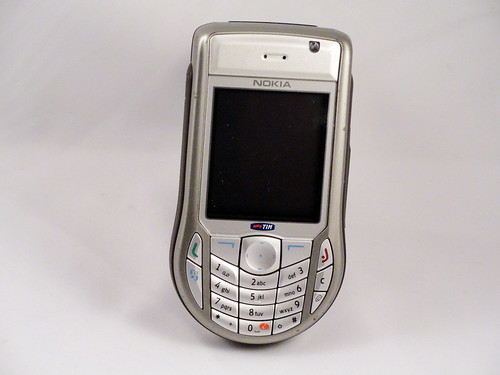
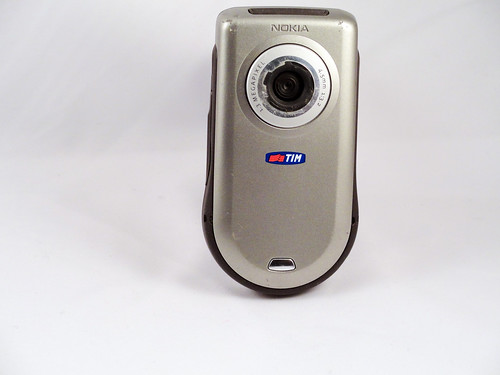
A phone a day: Nokia 6630 (2004)tag:orangecone.com,2012://2.4332012-03-21T03:37:03Z2012-03-21T03:49:27ZMuch like the 3620 that came out two years earlier, the 6630 is one of Nokia's "round on the bottom" phones, tuned to the form of use where you hold the phone with one hand and either operate it with the same hand or the other (unlike the Blackberry derivative phones, which are used symmetrically, with both hands holding the phone identically, and typing with thumbs). It's instructive to see how Nokia had progressed in this design by comparing the earlier phone with this one. The earlier phone had a bunch of small round buttons that reinforced the droplet shape to make the whole thing look more organically round. Those buttons must have been hard to hit, since this phone makes all the button targets about the same size and really attempts to maximize button size, so that they're all tightly packed, but still fitting into the keyboard circle at the bottom. I don't know if this was for ergonomic reasons or esthetic ones, but it makes the whole thing look more deliberate and functional, perhaps less playful. That's oddly fighting with the fact that the phone is ultimately shaped like a dumbbell and inherently comical. This is emphasized by...Mike Kuniavskyhttp://www.orangecone.com/
Much like the 3620 that came out two years earlier, the 6630 is one of Nokia's "round on the bottom" phones, tuned to the form of use where you hold the phone with one hand and either operate it with the same hand or the other (unlike the Blackberry derivative phones, which are used symmetrically, with both hands holding the phone identically, and typing with thumbs). It's instructive to see how Nokia had progressed in this design by comparing the earlier phone with this one. The earlier phone had a bunch of small round buttons that reinforced the droplet shape to make the whole thing look more organically round. Those buttons must have been hard to hit, since this phone makes all the button targets about the same size and really attempts to maximize button size, so that they're all tightly packed, but still fitting into the keyboard circle at the bottom. I don't know if this was for ergonomic reasons or esthetic ones, but it makes the whole thing look more deliberate and functional, perhaps less playful. That's oddly fighting with the fact that the phone is ultimately shaped like a dumbbell and inherently comical. This is emphasized by what looks to be an enormous camera lens on the back. Was that really necessary? All these things come together to make this whole phone line seem like a rather odd idea. I can see what they were going for, but the results are unbalanced in virtually every iteration.
]]>
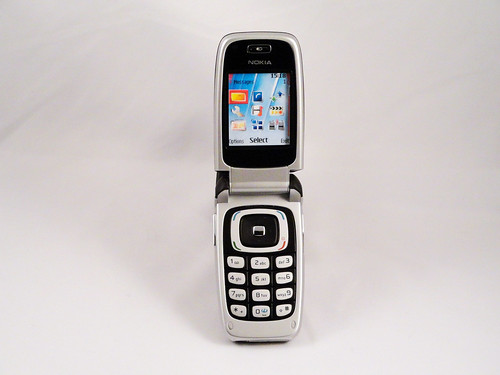
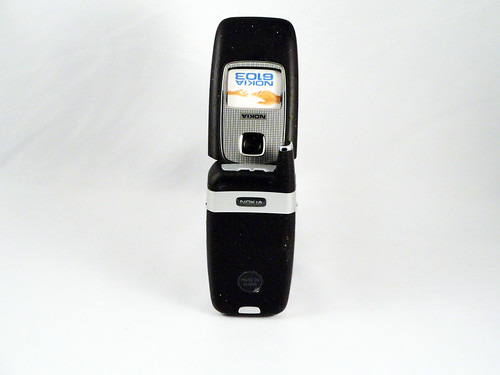
A phone a day: Nokia 6103 (2006)tag:orangecone.com,2012://2.4322012-03-19T16:30:02Z2012-03-19T17:07:32ZWhen we think of phones as commodities, we think of phones like this. When looking up reviews of it online, what many of them started with was "it's a lot like the 6101." That says to me that the reviewers considered this class of phones to be interchangeable and generic, a sure sign that a product has become an interchangeable commodity. It could be that the commodification of the mobile phone, a fantastic futuristic device that barely existed 15 years before this phone was made, had hit its peak by this point, and that's what drove the massive demand for something fundamentally new (which is, of course, the iPhone a year later). Stepping back, however, perhaps what makes it generic is that it's a perfection of a form--the small clamshell--that had run its course for the moment. It most certainly is a futuristic device. It's what science fiction always imagined a communicator would look like: a smooth pebble that pops open to reveal the controls of a sophisticated technological instrument that can do everything from send text messages to take photographs. It's just that every other phone in 2006 was from the same future. The market clearly needed a new...Mike Kuniavskyhttp://www.orangecone.com/
When we think of phones as commodities, we think of phones like this. When looking up reviews of it online, what many of them started with was "it's a lot like the 6101." That says to me that the reviewers considered this class of phones to be interchangeable and generic, a sure sign that a product has become an interchangeable commodity. It could be that the commodification of the mobile phone, a fantastic futuristic device that barely existed 15 years before this phone was made, had hit its peak by this point, and that's what drove the massive demand for something fundamentally new (which is, of course, the iPhone a year later). Stepping back, however, perhaps what makes it generic is that it's a perfection of a form--the small clamshell--that had run its course for the moment. It most certainly is a futuristic device. It's what science fiction always imagined a communicator would look like: a smooth pebble that pops open to reveal the controls of a sophisticated technological instrument that can do everything from send text messages to take photographs. It's just that every other phone in 2006 was from the same future. The market clearly needed a new future to explore.
]]>
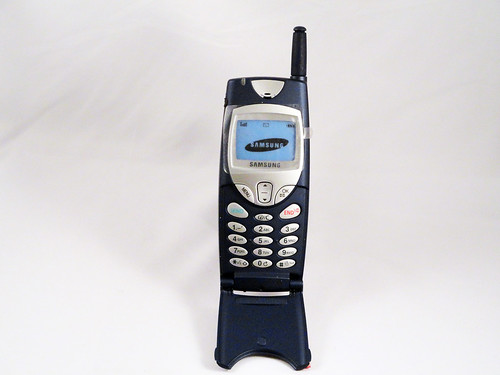
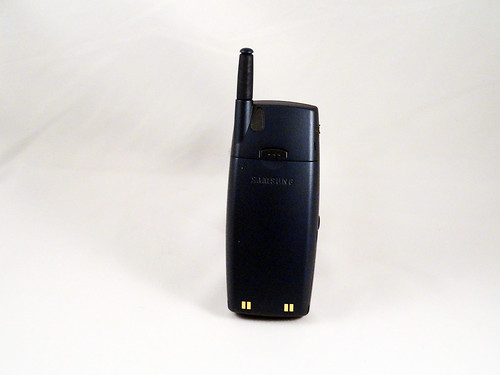
A phone a day: Anonymous Samsung Phone circa 2000-2001tag:orangecone.com,2012://2.4312012-03-18T03:01:51Z2012-03-18T03:22:20ZAfter a half-hour searching, I couldn't find the model number of this phone (help appreciated: email me at blog c/o this site). That may be just as well, since what matters is how it's designed to do what it does. In that, it's an interesting example of one of the last generation of mobile phones that we primarily phones, devices that were designed for talking. Not sending pictures, not browsing the net, just calling people and--to a lesser extent--texting. The texting angle is particularly interesting. This phone texts, but it still has a traditional keypad. However, texting had reached "hockey stick" adoption levels at this point (this source says that between January 1999 and December 2001 the number of text messages in the UK went from 100 million messages a month--already a huge amount--to 1.3 billion per month), but phones had not yet adapted to this new way of using them. Blackberry's great advantage was that RIM saw this behavior and began to design devices to exploit it. This device is still largely tuned to talking. It's big and it has that characteristic plastic flap that simultaneously covered the keypad and made the sound quality better. Because, of course, it's...Mike Kuniavskyhttp://www.orangecone.com/
After a half-hour searching, I couldn't find the model number of this phone (help appreciated: email me at blog c/o this site). That may be just as well, since what matters is how it's designed to do what it does. In that, it's an interesting example of one of the last generation of mobile phones that we primarily phones, devices that were designed for talking. Not sending pictures, not browsing the net, just calling people and--to a lesser extent--texting. The texting angle is particularly interesting. This phone texts, but it still has a traditional keypad. However, texting had reached "hockey stick" adoption levels at this point (this source says that between January 1999 and December 2001 the number of text messages in the UK went from 100 million messages a month--already a huge amount--to 1.3 billion per month), but phones had not yet adapted to this new way of using them. Blackberry's great advantage was that RIM saw this behavior and began to design devices to exploit it. This device is still largely tuned to talking. It's big and it has that characteristic plastic flap that simultaneously covered the keypad and made the sound quality better. Because, of course, it's about the sound. It sits in the hand well, and the silver buttons are really easy to see against the dark blue background, because it's a phone for dialing people's numbers. It wasn't until the Danger Hiptop exploded, as I remember, in 2003-2004 that others realized that a new way of communicating had taken over.
]]>
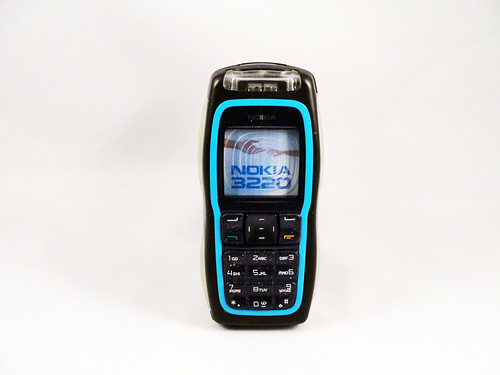
A phone a day: Nokia 3220 (2004)tag:orangecone.com,2012://2.4302012-03-15T20:17:22Z2012-03-15T20:30:13ZI love the design of this phone. As Nokia's first Internet-enabled phone (according to Wikipedia), this phone was going to stand out no matter what, but Nokia also decided to push the envelope in terms of design, perhaps trying to capture in the phone's design the future that Internet connectivity represented. What they ended up with was something that looks exactly like what a prop from a 70s science fiction film about the year 2004 would look like: bright blue, biomorphic, with LED backlit translucent silicone gripper pads so that you don't lose it while in orbit. It also had a rave lighting ringtone mode that no phone come close to. Here's a video: In short, it's a phone with enough vision and personality for five phones, and is a high point for Nokia's design, produced when they were probably at the peak of their confidence. It was also a pretty low-end phone, where all of the personality essentially came free with the manufacturing process. More phones should try to be this ambitious. Background on the A Phone a Day project....Mike Kuniavskyhttp://www.orangecone.com/
I love the design of this phone. As Nokia's first Internet-enabled phone (according to Wikipedia), this phone was going to stand out no matter what, but Nokia also decided to push the envelope in terms of design, perhaps trying to capture in the phone's design the future that Internet connectivity represented. What they ended up with was something that looks exactly like what a prop from a 70s science fiction film about the year 2004 would look like: bright blue, biomorphic, with LED backlit translucent silicone gripper pads so that you don't lose it while in orbit. It also had a rave lighting ringtone mode that no phone come close to. Here's a video:
In short, it's a phone with enough vision and personality for five phones, and is a high point for Nokia's design, produced when they were probably at the peak of their confidence. It was also a pretty low-end phone, where all of the personality essentially came free with the manufacturing process. More phones should try to be this ambitious.